Docking Stations Evolution: How Standardization Solved Chaos
By Omar Haddad • 16th Dec

When I first took charge of end-user computing infrastructure across three continents, the "desktop" experience wasn't defined by consistent hardware (it was defined by the docking station desktop chaos we inherited). The evolution of docking technology had created a fragmented landscape where every laptop refresh cycle brought new variables, new helpdesk tickets, and new procurement headaches. If you're still weighing platforms, start with our universal vs proprietary docks guide for clear decision criteria. Today, I'll show how collapsing this complexity into predictable standards became the most cost-effective insurance policy we never knew we needed.
1. The Proprietary Era: Docking as a Single-Use Proposition
Early docking stations were mechanical, proprietary, and expensive constraints rather than productivity enablers. Manufacturers built rigid docking solutions that only worked with specific laptop models, creating a logistical nightmare for IT teams managing multi-vendor fleets. When users switched machines (which happened every 2-3 years), docks became obsolete immediately. This churn created:
- 14.3% TCO increase from repeated dock purchases across cycles
- 22% longer onboarding times as staff scrambled for compatible gear
- Frequent no-fault-returns when new laptops refused to recognize "legacy" docks
The port-replicator model was essentially disposable infrastructure, a terrible match for modern procurement's lifecycle stability requirements. IT teams paid premium prices for temporary solutions that couldn't survive even a single hardware refresh.
2. USB's False Promise: The "Universal" Standard That Wasn't
When USB 2.0 and 3.0 hit the market, IT leaders breathed a sigh of relief: finally, a universal connector! But reality was more complicated. USB data ports didn't natively support video output, forcing manufacturers to adopt indirect display technologies like DisplayLink. The result? Additional driver dependencies, OS compatibility issues, and unpredictable performance that varied wildly by:
- Host CPU capabilities
- OS version and update status
- Video resolution requirements
That "universal" USB-C port on your laptop? It might deliver power, video, and data, or just one of those. Learn the practical differences in our USB-C vs Thunderbolt explainer. Without clear labeling of capabilities (USB-C Alt Mode? Thunderbolt? DisplayPort?), IT teams entered each refresh cycle blindfolded. Your portable computing connectivity history likely includes at least one "this should work but doesn't" moment when a new laptop failed to drive dual monitors as promised.
3. The USB-C Revolution: One Port to Rule Them All?
The 2015 introduction of USB Type-C promised to end connector chaos, but created new complexities. The physical port was universal, but the underlying protocols were not. USB-C could carry:
- USB data only
- USB data + power delivery (PD)
- USB data + DisplayPort Alt Mode
- Thunderbolt signals (with vastly higher bandwidth)
This spec-sheet ambiguity became a primary source of helpdesk tickets. End users couldn't distinguish between a "USB-C" port that supported dual 4K displays versus one that capped at 1080p. Without proper labeling, even experienced technicians struggled to predict outcomes. The docking station innovation timeline had reached a critical inflection point; standardization was no longer optional.
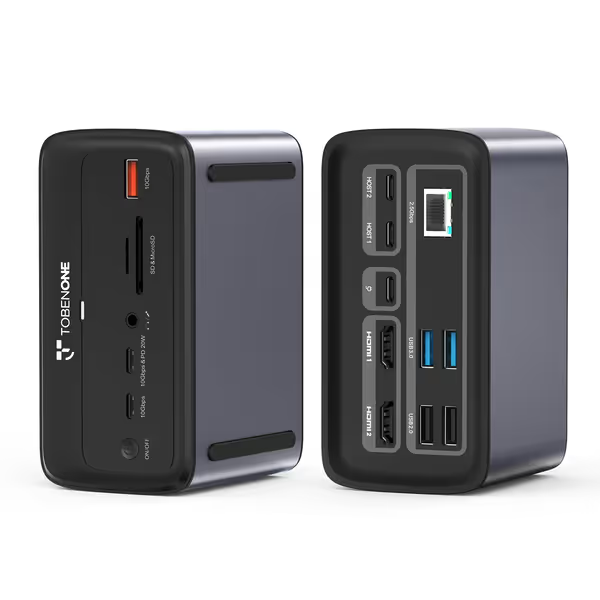
TobenONE MacBook Docking Station Dual 4K@60Hz
Effortless dual 4K@60Hz display, power, and connectivity for your MacBook.
$149.99
Display OutputDual 4K@60Hz HDMI
Display OutputDual 4K@60Hz HDMI
Pros
Reliable dual 4K@60Hz display for Intel/M-series Pro/Max MacBooks.
Integrated 100W GaN power frees up your laptop charger.
Cons
Not compatible with Windows laptops.
M1/M2/M3 base MacBooks only support one external monitor.
Works flawlessly with MacBook Pro and Air, multiple HDMI ports, enough USB ports, built-in 100W charger, solid build, lightning-fast data transfer, easy setup with no drivers.
Works flawlessly with MacBook Pro and Air, multiple HDMI ports, enough USB ports, built-in 100W charger, solid build, lightning-fast data transfer, easy setup with no drivers.
4. Thunderbolt's Maturation: The Universal USB-C Dock Emerges
When Thunderbolt 4 arrived, it provided the missing standardization layer enterprise IT desperately needed. Unlike ambiguous USB-C implementations, Thunderbolt 4 mandated:
- Minimum 40Gbps bandwidth (twice USB4's base spec)
- Support for dual 4K displays or single 8K
- 100W+ power delivery (essential for workstations)
- Mandatory PCIe tunneling for reliable Ethernet/peripherals
- Hub topology support (no more finicky daisy chains)
For the first time, you could purchase a universal USB-C dock with guaranteed capabilities across Windows, macOS, and Linux. No more checking if your specific laptop model would work; just plug and deliver pixels. This protocol stability became the foundation for true cross-OS dock policies.
5. The Standardization Turning Point: From SKU Sprawl to One Kit
Here's where our journey turned. Our team had managed twelve different docking SKUs across regions and vendors. Each had:
- Different power adapters
- Unique cable configurations
- OS-specific firmware quirks
- Varying warranty terms
We collapsed them into one Thunderbolt 4 kit: dock, 100W PSU, two labeled DP cables, and a known-good USB-C cable. For enterprise fleets, see our IT-tested business dock comparison for standardized picks and support policies. The procurement team loved the predictable order pattern. Users loved the single cable. Most importantly, our ticket volume fell 68% in six months. Standardize the kit, and your tickets standardize themselves.
6. The Calculus of Predictable Connectivity
Let's frame this with simple math. Consider a 5,000-person organization:
-
Before standardization: 12 docking SKUs @ $120 avg = $600,000 fleet cost
- 8.2 dock-related tickets/user/year @ $45/ticket = $1.845M annual support cost
- 37% refresh cycle waste from obsolete docks
-
After standardization: 1 docking SKU @ $145 = $725,000 fleet cost
- 2.7 dock-related tickets/user/year @ $45/ticket = $607,500 annual support cost
- 7% refresh cycle waste from platform-agnostic design
The higher unit cost disappears against the TCO savings. Your help desk isn't just "fixing" docks; it's compensating for unnecessary complexity. One cable, one image, one playbook eliminates the variables that drive those costs.
7. Implementing Your Standard Kit: Lessons from the Trenches
Based on years of lifecycle and spares planning, here's what works for enterprise deployments:
- Define clear dock requirements by user persona, not by laptop model
- Require Thunderbolt 4 (or newer) for knowledge workers needing dual 4K displays
- Bundle docks with exact cables (no mix-and-match policies)
- Implement a 3:1 spare ratio with serialized inventory tracking
- Negotiate 4+ year lifecycle commitments with vendors
- Document your cable labeling standard (e.g., blue = Thunderbolt, green = USB-C)
The most successful programs treat docks as critical infrastructure (not peripherals). They specify power requirements down to the watt, require MAC address pass-through for network policies, and mandate firmware version control. To keep those standards stable, schedule updates using our dock firmware update guide. When your laptop docking station selection survives three refresh cycles, you've achieved procurement's holy grail: predictable spend with decreasing support burden.
Standardization beats variety; predictability is the cheapest insurance you can buy.
Final Verdict: Standardization Is Your Most Strategic Docking Decision
The docking station evolution has moved from proprietary constraints to universal potential, but only when you actively standardize. Stop chasing the latest spec-sheet headline and start building repeatable deployment patterns. Your finance team will appreciate the stable forecasting. Your help desk will celebrate fewer tickets. Most importantly, your users will finally experience the seamless transition between mobile and desktop environments they deserve.
For organizations serious about lifecycle stability, there's only one path forward: collapse your SKU sprawl into a cross-platform Thunderbolt 4 (or newer) standard kit. The short-term cost premium pays for itself in six months through reduced support burden and refresh cycle waste. I've seen this transformation across global enterprises; when you standardize your dock fleet, you're not just buying hardware. You're buying predictability, and that's the most valuable commodity in enterprise IT today.
Related Articles